Install the extension
- Add it to ChromeOpen Amazon Review Sync Collector on the Chrome Web Store and choose Add to Chrome. Use the same Chrome you open your Shopify admin in.
- Log in to AmazonIn that Chrome, log in on each Amazon site your products use, for example amazon.in and amazon.com. Amazon keeps a separate login for each country.
- Reload the appReload the app in your Shopify admin. It finds the extension, and the collect options appear.
Collect one product
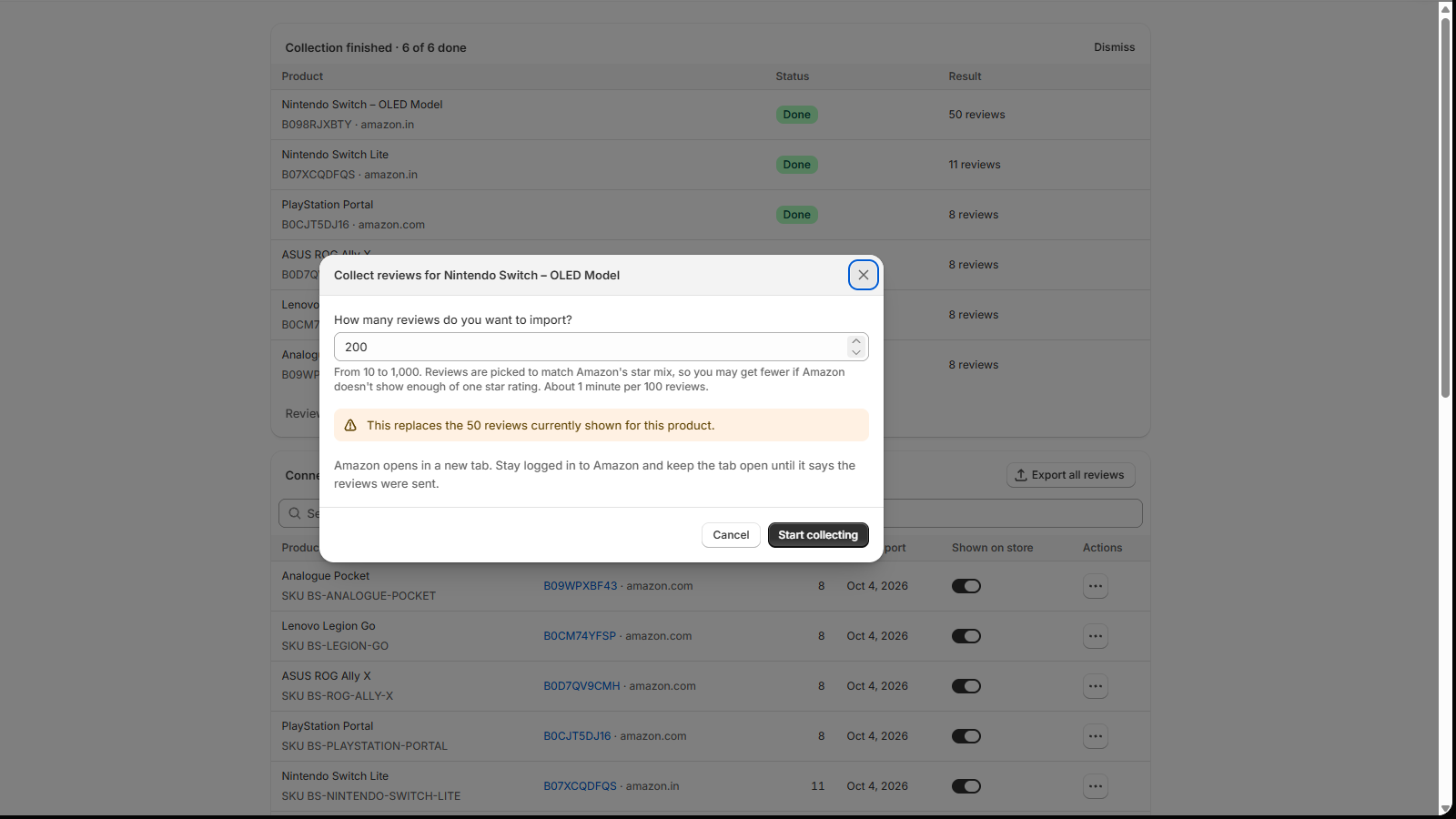
- Open the product's menuOn Home, open the product's actions menu (⋯) and choose Collect on Amazon (optional).
- Choose how manyEnter how many reviews you want, from 10 to 1,000 (200 to start with). It takes about 1 minute per 100 reviews.
- StartChoose Start collecting. Amazon opens in a new tab with a small status box, like "reading 5-star reviews, 1 of about 5 views".
- Wait for "sent"Keep the tab open until the box says the reviews were sent and you can close the tab. The reviews are already in the app.
Collect many products
- As you connect: with the extension installed, saving products in Connect products starts collecting 100 reviews each.
- Everything still waiting: choose Collect pending products (N) above the Connected products table to collect every product that has no reviews yet.
- One tab, one by one: a run handles up to 20 products in one tab, 20 to 40 seconds apart. Products you save during a run join it.
- Watch progress on Home: each product shows Waiting, Collecting, Done, Failed or Skipped. Stop skips the rest; products already done keep their reviews.
How reviews are picked
The extension reads the product's star breakdown on Amazon and collects reviews in the same proportions. If Amazon shows 66% five-star reviews, 66% of what you collect is five-star. It prefers reviews with text and verified purchases, and keeps each review's real date.
If Amazon doesn't show enough reviews of one star rating, you get fewer reviews in total so the mix stays right.
If something interrupts it
- Amazon asks you to sign in: sign in on that tab. The run waits and carries on.
- Amazon shows a captcha: progress is saved. Complete the captcha and reload the tab.
- "Log in to Amazon" in the progress list: you aren't logged in on that product's Amazon site. Log in there and collect again.
Go easy. Collect a few products at a time. If Amazon says it has limited review access on your account, stop and verify your account with Amazon before you collect again.
Privacy
- It only acts on collections you start from the app, for that product, and each job expires.
- It sends reviews only to the Amazon Review Sync app.
- It never reads your Amazon password, cookies, orders or browsing history, and has no tracking or analytics.
Using a browser other than Chrome? The extension runs in Google Chrome only for now. CSV import works in any browser.
Stuck on a step?
In the app, choose Help at the bottom right and Talk to support, or email support@tangledata.com. Tell us the product and what you see.