New Using Judge.me? Show Amazon reviews next to it, with no second review form. See how

Shopify app · Amazon reviews

Your Amazon reviews, on your Shopify store.

Your products already have reviews on Amazon. Show them on your own product pages, so shoppers see real feedback before they buy. Import a CSV, or collect them in one click with the optional Chrome extension, matched to Amazon's star mix.

  • Up to 1,000 reviews per product
  • Matches Amazon's star mix
  • 20 Amazon marketplaces
  • Shopper reviews, approved by you
  • Reply, hide or edit reviews
  • AI summary of reviews
  • Works next to Judge.me
  • Export to Judge.me or CSV
14-day free trial then $6.99 / 30 days Billed by Shopify No code
your-store.com/products/aurora-earbuds
Aurora Audio
Aurora Wireless Earbuds
★★★★★ Amazon rating: 4.4 (128)
$49.00
Add to cart

What buyers say on Amazon

Sort: Most detailed
4.4★★★★★128 reviews
5★66%
4★17%
3★8%
2★3%
1★6%
Review summaryBuyers like the punchy sound, the fit for long calls and the battery life. A few say the touch controls are too sensitive.AI-generated from the text of 128 reviews.
★★★★★Great sound for the price

Bass is punchy and the case charges fast.

Ananya · Aug 17 · Verified purchase on Amazon
★★★★☆Comfortable fit

Fits well for long calls.

Reviewed on this store · Rahul K.
Reply from the store Thanks Rahul!
Amazon's star mixnot just the 5-star ones
20 marketplaces.com, .in, .co.uk, .de…
Export to Judge.meready-to-import file
You approveevery shopper review
20Amazon marketplacesUS, India, UK, EU, Japan and more
1,000Reviews per productfrom CSV or the Chrome extension
~1 minPer 100 reviewscollected from your Amazon login
<10 KBStorefront scriptserved through your store, no third-party calls

Three ways to use it

Fits the way your store already works

Make it your review app, run it next to the one you have, or use it to bring Amazon reviews into Judge.me.

★★★★★ From Amazon Verified
★★★★☆ From your store Approved
★★★★★ Reply from the store Public
Setup 1 · All-in-one

As your review app

Amazon reviews and your own shoppers' reviews in one block, with a star rating under the title. Approve, reply and style them from one place.

  • Amazon and store reviews together
  • Write a review form, you approve first
  • AI summary and rating breakdown
Use it as your review app
Your review app
★★★★★
Reviews from Amazon
★★★★☆
Setup 2 · Side by side

Next to your review app

Keep Judge.me, Loox or Yotpo for customer reviews. Add Amazon reviews in their own block, with no second "Write a review" button.

  • One switch turns off our review form
  • Your app keeps its reviews and emails
  • Amazon proof right below your own
Use it next to your app
Amazon reviews
judgeme-import.csv
Setup 3 · Import

Into Judge.me

Get your Amazon reviews here, then download a file in Judge.me's import format. A standard CSV works for other review apps.

  • Judge.me columns and date format
  • Standard CSV for Loox, Yotpo, Okendo
  • Hidden and pending reviews left out
Import into Judge.me

How it works

Live on your store in three steps

No code and no theme edits. Everything happens in your Shopify admin and theme editor.

1

Connect your products

Pick products with Shopify's product picker and paste each one's Amazon link or ASIN. Up to 50 in one form, or 500 from a CSV.

Product pickerPaste a listCSV

Tutorial

2

Get the reviews

Import a reviews CSV (up to 1,000 per product), or let the Chrome extension collect 10 to 1,000 per product from your logged-in Amazon.

CSV importChrome extensionReal dates

Tutorial

3

Show them on your store

The setup guide opens your theme editor with the Reviews block in place. Add the Star rating block under the title and save.

Reviews blockStar rating blockOnline Store 2.0

Tutorial

Credible, not cherry-picked

Matches Amazon's star mix, review for review

A page with only 5-star reviews looks staged. The Chrome extension reads your product's star breakdown on Amazon and picks reviews in the same proportions.

  • Ask for 200 reviews and get the mix shoppers see on Amazon
  • Prefers written reviews and verified purchases
  • Keeps each review's real date from Amazon
  • Every review shows where it came from

Prefer to show only 5-star reviews? That's one switch in Display settings. The rest stay saved in the app.

On Amazon

2,431 ratings · 4.4 average

5★66%
4★17%
3★8%
2★3%
1★6%

On your store

200 reviews collected

5★132
4★34
3★16
2★6
1★12
Same shape, so shoppers get the same picture they'd get on Amazon.

Features

Everything a review section needs

One plan with every feature. No add-ons, no review limits by plan.

Star rating block

Average and count under the product title, linked to the reviews. Your label, your colors.

Reviews block

Grid or list, rating breakdown with a tap-to-filter star bar, sorting, Read more and Show more reviews.

Shopper reviews

A Write a review form on every product page, with spam protection. New reviews wait for your approval.

Every review in one list

Search, filter by source, rating or product, and publish, reject or hide many reviews at once.

Reply and edit

Public replies show under the review as "Reply from the store". Edits keep the original, and you can restore it.

Hide with a reason

Spam, off-topic, offensive or personal information. Hidden reviews stay hidden after you import again.

AI review summary

A short summary of what buyers like and dislike, labelled as AI-generated. Opt-in, for products with 5+ written reviews.

Your brand, once

Use your theme's colors or pick your own: accent, stars, cards, font, corners, layout. A live preview shows the result.

Fast and private

A script under 10 KB that loads reviews through your store's own address. No third-party requests from your storefront.

Optional Chrome extension

Collect reviews in one click, from your own Amazon login

No spreadsheets. Start a collection in the app and the extension does the scrolling for you in a normal Chrome tab.

  1. Choose how many reviewsFrom 10 to 1,000 per product. New products start collecting as soon as you connect them.
  2. Amazon opens in a new tabA small status box shows progress. Runs of up to 20 products go one after another in one tab.
  3. Reviews land in your appMatched to Amazon's star mix, with real dates. Close the tab when it says the reviews were sent.

No Chrome, or prefer files? CSV import does the same job, no extension needed.

Collecting reviews 3 of 5 done

Aurora Wireless EarbudsB0F8BVSK21 · amazon.inDone200 reviews
Aurora Sport EarbudsB0C4XWR2LM · amazon.comDone150 reviews
Aurora Charging CaseB0D1KTQ8ZN · amazon.co.ukDone64 reviews
Aurora Over-Ear ProB0B9PLM3QD · amazon.inCollecting…
Aurora Kids HeadphonesB0E2HSN7VA · amazon.inWaiting—
Only acts on collections you start Never reads passwords, cookies or orders No tracking or analytics
Amazon Review Sync: reading 4-star reviews, 2 of about 5 views (38 in this view)

Real screens

What you and your shoppers actually see

Captured from a live Shopify demo store running the app.

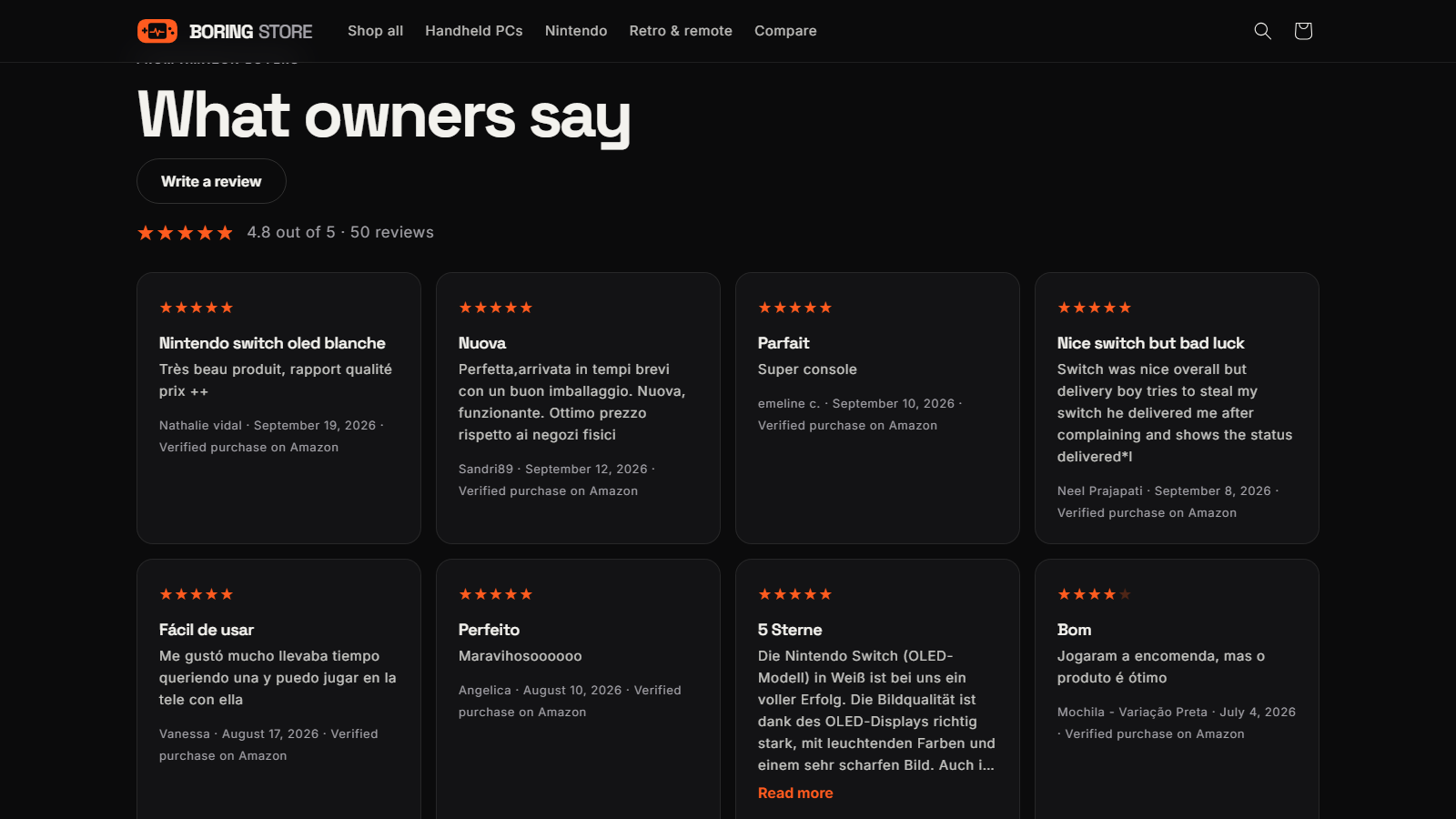
Review cards on a product page, each with the reviewer, date and 'Verified purchase on Amazon'
Your product page. Review cards in your theme's style, each showing its source.
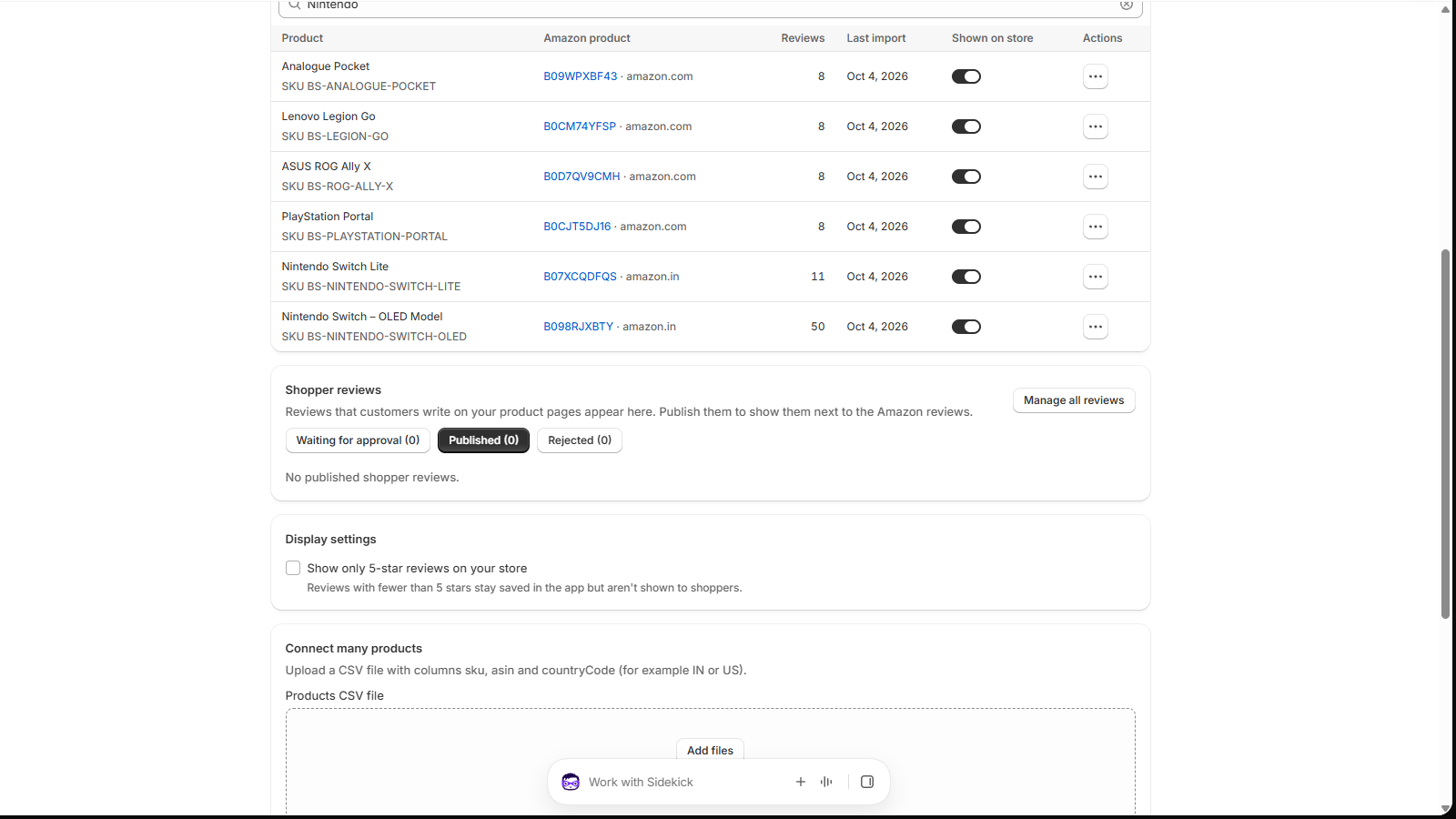
Connected products table with Amazon ASIN, marketplace, review count and a Shown on store switch
Connected products. Each product's Amazon listing, review count and an on/off switch.
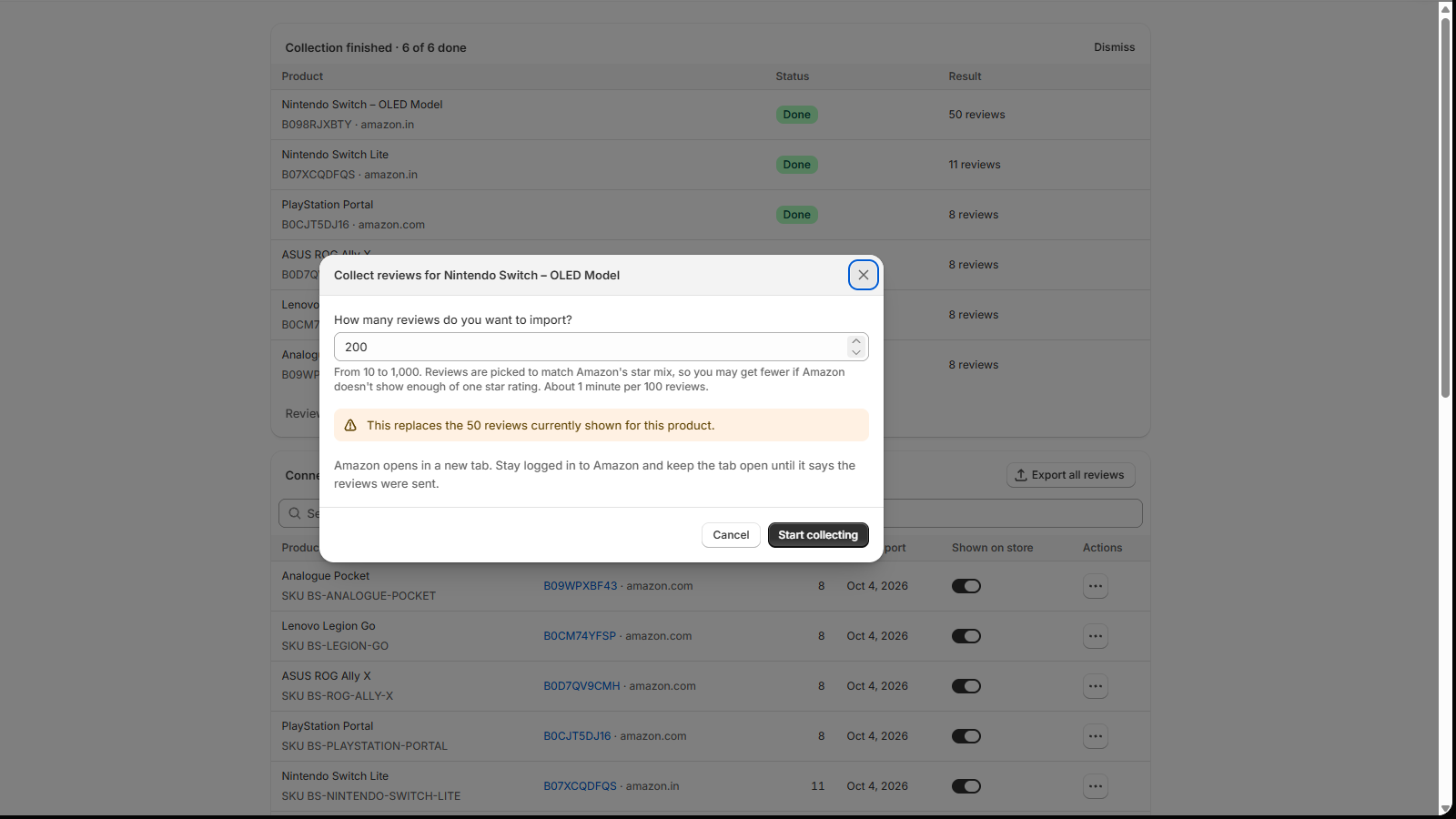
Collect reviews dialog asking how many reviews to import, from 10 to 1,000
Collect on Amazon. Pick how many reviews; the run's progress shows on Home.
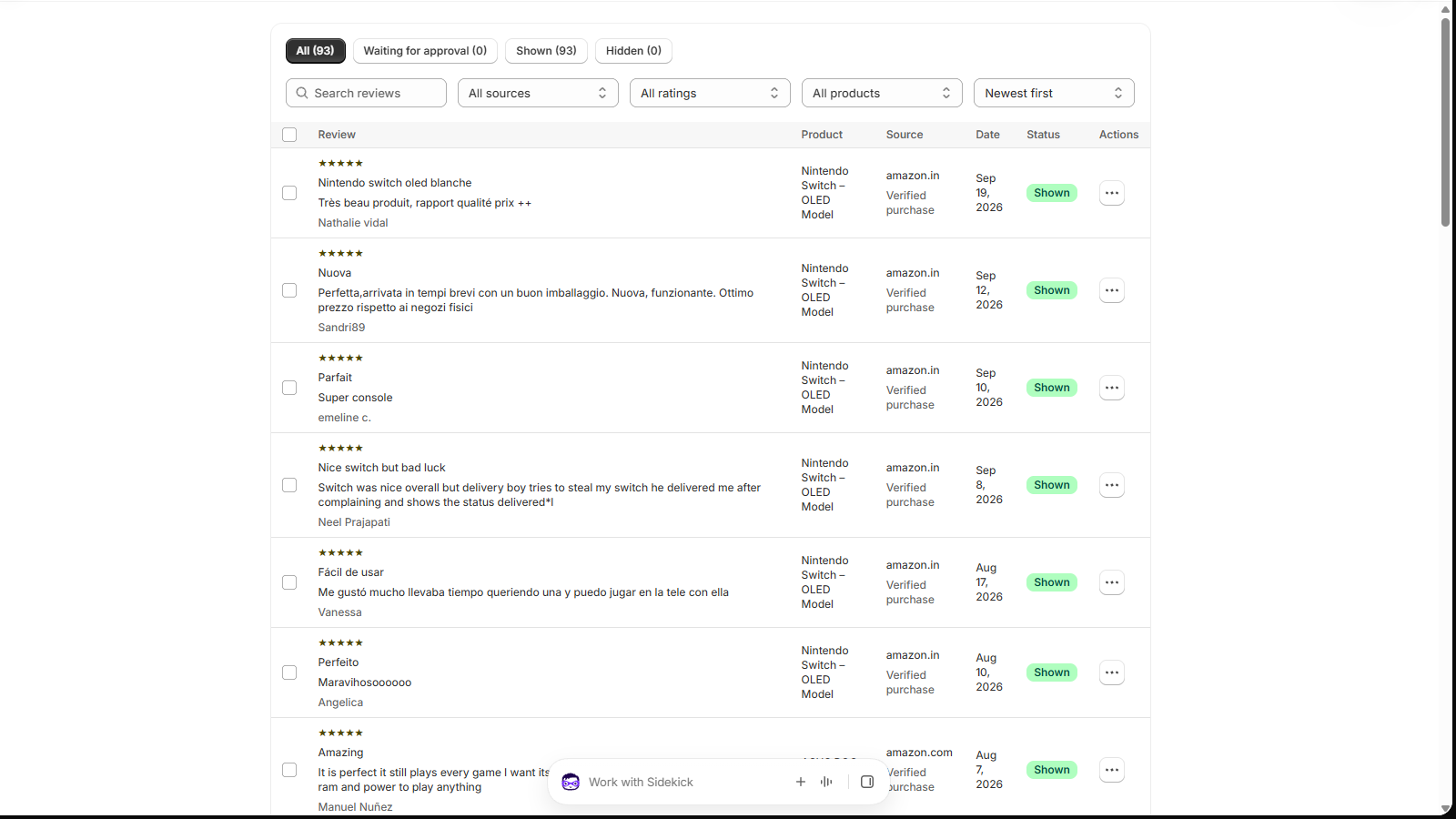
Reviews page listing every review with filters for source, rating and product
Reviews page. Every Amazon and shopper review in one filterable list.

Already have a review app?

Keep it. Add Amazon to it.

Amazon Review Sync doesn't ask you to switch. Run it beside your review app, or move your Amazon reviews into it.

Judge.meLooxYotpoStampedOkendo
You want toDo this
Show bothTurn on Do not allow adding reviews. Your app keeps collecting; ours shows Amazon reviews only. How
Use Judge.me onlyExport with the Judge.me import format and upload it to Judge.me. How
Use another appExport a standard CSV and map rating, title, review, author and date. How

Pricing

One plan. Everything included.

Try every feature free for 14 days. Shopify bills the plan with your store's invoice.

14-day free trial

Standard

$6.99/ 30 days

After your free trial. Billed by Shopify in USD.

  • Unlimited connected products
  • Up to 1,000 reviews per product
  • CSV import and Chrome extension
  • Reviews and Star rating blocks
  • Shopper reviews and moderation
  • Replies, edits and hiding
  • AI review summary
  • Export to CSV and Judge.me
Start your free trial

Free on development stores

Agencies and developers can set it up on a development store at no cost. Shopify never bills test charges.

Help from the people who built it

Use Talk to support inside the app or email support@tangledata.com. Want a walkthrough? Book a 30-minute call.

Your data stays yours

Export everything at any time. Uninstall and the app deletes your shop's data.

FAQ

Questions merchants ask

Do I need the Chrome extension?

No. The extension is optional. It collects your own product's reviews from Amazon while you're logged in. Importing a CSV file always works without it. The extension runs in Google Chrome only for now.

Which Amazon marketplaces are supported?

20: amazon.com, .in, .co.uk, .de, .fr, .ca, .com.au, .it, .es, .co.jp, .com.br, .com.mx, .nl, .ae, .sa, .com.tr, .sg, .se, .pl and .com.be.

Do reviews update automatically from Amazon?

No. Reviews change only when you import a CSV or collect again with the extension. A new import replaces that product's Amazon reviews. Your shoppers' reviews stay, and so do your replies, edits and hidden reviews for reviews that come back.

Can I use it with Judge.me or another review app?

Yes. Turn on Do not allow adding reviews in Display settings. Our block then shows only Amazon reviews, with no Write a review button, and your other app keeps collecting and showing your customers' reviews. See the setup.

Can I import my Amazon reviews into Judge.me?

Yes. Export with the Judge.me import format and upload the file in Judge.me under Settings › Import reviews › Import from a spreadsheet. Step-by-step guide.

Will it slow down my store?

The storefront script is under 10 KB. Reviews load through your store's own app proxy and are cached briefly, with no third-party requests from your storefront.

Does it work with my theme?

It works with Online Store 2.0 themes, which support app blocks (all current Shopify themes do). You add the blocks in the theme editor without touching code.

Can I hide or edit a review?

Yes. Hide an Amazon review with a reason (spam, not about this product, offensive, personal information, duplicate or legal request), reply publicly, or edit a review. Edits are marked, and the original is kept so you can restore it.

What doesn't it do yet?

Stars on collection pages, Google rich results and review photos aren't available yet, and the storefront text is in English only. Tell us what you need through Talk to support: it decides what we build next.

What happens to my data if I uninstall?

Your shop's connections, reviews, shopper reviews, AI summaries and settings are deleted. Export first if you want to keep a copy. See the privacy policy.

Your best reviews are already written.

Put them on your product pages. 14-day free trial, then $6.99 every 30 days, billed by Shopify.